
This is to convert the User Portal to a Chrome Application and PIN the application to the task bar.
Step 1: Open Chrome and log into the User Portal.
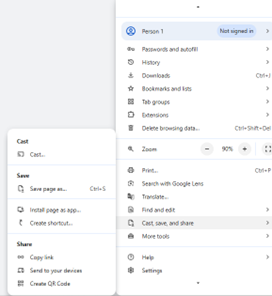
Step 2: Click on the settings menu in the upper right – the three vertical dots. Then click on Cast, save & share / Create shortcut.
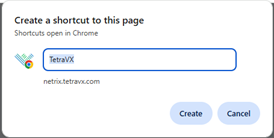
Step 3: The Create Shortcut window will appear. Rename it if wanted. Check the Open as Window option and click Create.
Step 4: Right click on the shortcut and click on Pin to Taskbar.
Step 5: This icon will now be saved on the taskbar and will go directly to the user portal in a separate window when clicked. Example of app is below.