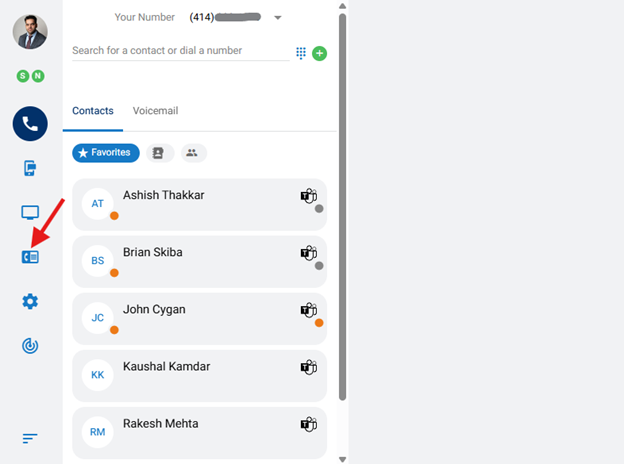
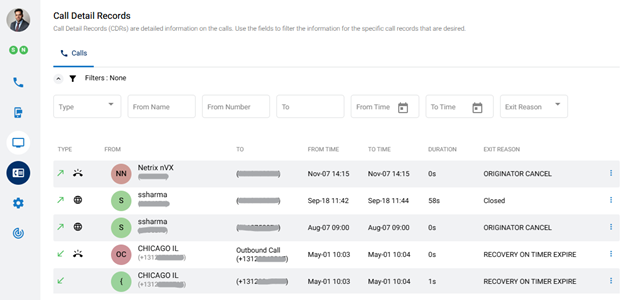
Call Detail Records (CDRs) show information on individual calls. To view your Call Detail Records, click the Call Detail Records menu icon, on the left panel of the dashboard. Records can be filtered and sorted.
Available information in Call Details
Each record contains the following details:
Type – Direction of call and endpoint used.
From – Originating calling number with caller ID or user information
To – Called party extension or number.
From Time – Date and time the call originated
To Time – Date and time the call ended
Duration – Length of call
Exit Reason – Termination code of call
Recording – To play, download or delete the recording. (if enabled)
Call Back option – Click on the three vertical dots to have the remote end number appear and then click on the pop-up to click to dial from here.
Note: The list of records can be sorted (ascending or descending) by any of the fields noted above
Filtering Records
Click on the Expansion arrow next to Filters.
Records can be filtered by:
Call Type – Select Inbound, Outbound or Local
From Name – Enter the originating caller information as displayed on the Caller ID (CID) or the user’s name, if internal call.
From Number – Enter the originating phone number or extension of the call
To Number – Enter the called number or extension.
From Time – Enter the beginning date of the filter to be applied. (The calendar icon can be used to select the date)
To Time – Enter the end date of the filter to be applied. (The calendar icon can be used to select the date)
Exit Reason – Select the exit reason to be applied, such as Abandoned, Allotted Timeout, Attended Transfer, Blind Transfer, Call Rejected or Chan Not Implemented.
Note: Number searches support the use of an asterisk (*) as a wildcard character; meaning, any character or sequence of characters in a search
March 11, 2025
Engineering-led IT and AI since 1989. We run, build, and secure the technology your business depends on, and we treat your business like it's the only one we've got.